
#3510 closed defect (fixed)
TA save png failed os8 xo-1.75
| Reported by: | tonyforster | Owned by: | walter |
|---|---|---|---|
| Priority: | Unspecified by Maintainer | Milestone: | Unspecified |
| Component: | Turtleart | Version: | Unspecified |
| Severity: | Unspecified | Keywords: | |
| Cc: | Distribution/OS: | Unspecified | |
| Bug Status: | Unconfirmed |
Description
Traceback (most recent call last):
File "/home/olpc/Activities/TurtleArt.activity/TurtleArt/talogo.py", line 482, in doevalstep
self.step.next()
File "/home/olpc/Activities/TurtleArt.activity/TurtleArt/talogo.py", line 461, in _evalsym
result = self.cfun.fcn(self, *self.arglist)
File "/home/olpc/Activities/TurtleArt.activity/plugins/turtle_blocks_extras/turtle_blocks_extras.py", line 238, in <lambda>
lambda self, x: primitive_dictionarysavepix?(x))
File "/home/olpc/Activities/TurtleArt.activity/plugins/turtle_blocks_extras/turtle_blocks_extras.py", line 1099, in _prim_save_picture
self.tw.save_as_image(name)
File "/home/olpc/Activities/TurtleArt.activity/TurtleArt/tawindow.py", line 3258, in save_as_image
save_picture(self.canvas, file_path)
File "/home/olpc/Activities/TurtleArt.activity/TurtleArt/tautils.py", line 277, in save_picture
img_surface.write_to_png(file_name)
TypeError: Surface.write_to_png takes one argument which must be a filename (str), file object, or a file-like object which has a "write" method (like StringIO)
Attachments (2)
Change History (7)
Changed 12 years ago by tonyforster
comment:1 Changed 12 years ago by tonyforster
- Component changed from untriaged to Turtleart
- Owner set to walter
comment:2 Changed 12 years ago by walter
comment:3 Changed 12 years ago by walter
- Resolution set to fixed
- Status changed from new to closed
fixed in v139, although the root cause is still somewhat of a mystery.
comment:4 Changed 12 years ago by tonyforster
works ok in v139
FWIW green text boxes are all type unicode and purple number boxes are all type float
comment:5 Changed 12 years ago by tonyforster
I wasn't quite right there, the text block on the pallette is type string but it becomes type unicode when edited


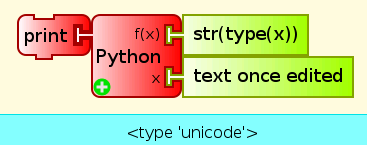
This is a bit strange. The error is triggered because somehow the string you are using for the file name is type unicode instead of type string. Not sure how that could have happened. I'll add a conversion in these cases, but will also try to find the root cause, i.e., where the unicode conversion is happening.