
Opened 14 years ago
Closed 11 years ago
#2377 closed defect (obsolete)
TA show source, some files not visible
| Reported by: | tonyforster | Owned by: | tomeu |
|---|---|---|---|
| Priority: | Unspecified by Maintainer | Milestone: | Unspecified |
| Component: | Sugar | Version: | Unspecified |
| Severity: | Unspecified | Keywords: | view-source |
| Cc: | walter, bernie, rgs | Distribution/OS: | Unspecified |
| Bug Status: | Unconfirmed |
Description
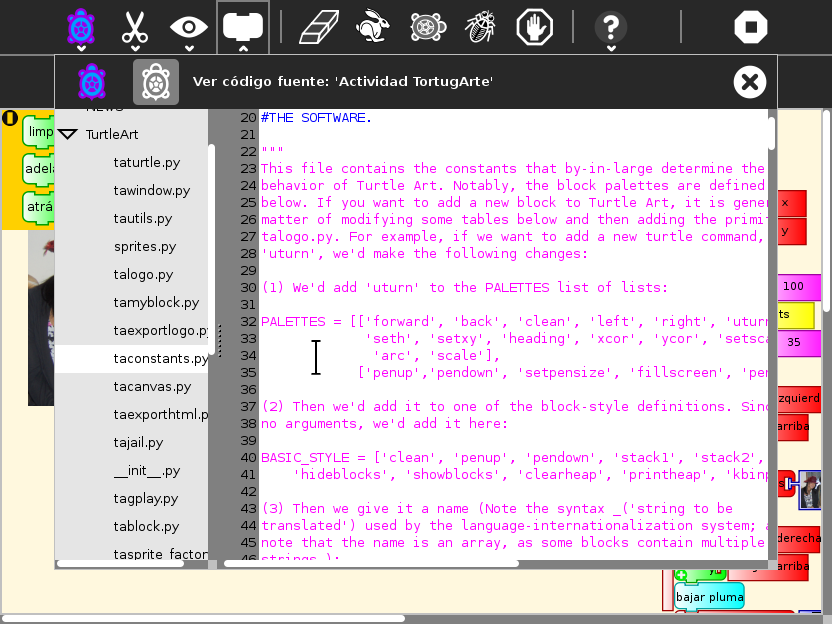
Just noticed that the source files in the TurtleArt directory are not visible in show source
Attachments (1)
Change History (9)
comment:1 Changed 14 years ago by walter
- Cc walter added
- Component changed from Turtleart to sugar
- Keywords view-source added
- Owner changed from walter to tomeu
Changed 14 years ago by walter
comment:2 Changed 14 years ago by walter
- Resolution set to invalid
- Status changed from new to closed
As per the attached screen shot, I think that view source is actually behaving OK. Perhaps Tony didn't press on the arrow to uncollapse the subdirectory view??? Could be worth exploring with the design team how to make that more obvious.
comment:3 Changed 14 years ago by tonyforster
- Resolution invalid deleted
- Status changed from closed to reopened
I an OS373pyg XO1 TA99
arrows point right
greyed selection takes 2 clicks to move it
arrow has black border with grey fill
hover is white border white fill
no amount of clicking will make arrow point down or show contents
???
comment:4 Changed 14 years ago by walter
- Cc bernie added
I'll retest with os373pyg. It works fine with TA v99 in sugar-jhbuild with recent bits.
comment:5 Changed 14 years ago by walter
- Cc rgs added
I've now seen this behavior (intermittently) on 0.84. Also on 0.84, often view source fails altogether. I've done some consolidation of the view_source code (see patch) but the problem still persists.
comment:6 Changed 14 years ago by tomeu
No exception in the logs? Is it still thought to be a problem in the shell?
comment:7 Changed 14 years ago by tonyforster
No logs in Activities or shell. Just tried Browse, Log and TA.
The triangle arrows dont rotate when selected, dont know offhand whats in the directories so cant be sure if files are not displaying other than ta, its strange behaviour, it takes 2 clicks to select as described above.
373pyg xo1
comment:8 Changed 11 years ago by dnarvaez
- Resolution set to obsolete
- Status changed from reopened to closed
Not reproducable, 3 years old.


This seems to be a more general Sugar problem. Reassigning.